 EaseOps Operations
Hospital operations management on WhatsApp and voice
Daily rounds, checklists, patient concierge, forms and reminders in one app on the phone staff already carry, logged by voice and filed automatically, with alerts on WhatsApp. Staff do less. Management sees everything live.


EaseOps runs hospital rounds, checklists, patient concierge requests and digital forms in one light app on the phone staff already carry, with alerts on WhatsApp. Staff log by voice. Management sees everything live. No paper, and nothing for the ward to learn beyond a list of what is due.
Nobody chases a checklist that chases itself.
The task finds the shift. The shift answers it.
A round goes out to the phone the nurse already carries, comes back with a photo, a signature and a time against it, and is scored rather than ticked.
What fails becomes somebody’s job, not somebody’s note.
A failed check raises a service request with an owner, a due time and an escalation ladder behind it, and says so on WhatsApp while there is still a shift left to fix it.
What is EaseOps Operations?
EaseOps Operations is the daily hospital operations module: rounds, checklists, digital forms and registers, patient concierge, feedback, surveys and reminders. Staff are told on WhatsApp what needs them, answer it in the app by speaking rather than typing, and the system files the record automatically. No paper, no clipboard, no manual follow-up.
What it runs
Six operational workflows that hospitals typically manage across clipboards, WhatsApp groups, phone calls, and disconnected software — all consolidated into one system that staff access through the WhatsApp they already use.
Daily Rounds
Structured role-specific rounds in the app, announced on WhatsApp when one is waiting. Findings are logged by voice and timestamped automatically — creating audit-ready evidence for NABH without any additional documentation step.
Checklists
Assigned to the right person at the right time. Completed on mobile. Missed items escalate automatically — no coordinator needed to chase completion.
Digital Forms and Registers
Replace paper registers entirely. Filled in the app. Records are searchable and audit-ready — no scanning, no physical storage, no missing pages.
Reminders and Notifications
Staff are notified directly when a task is pending. No coordinator calling around to chase completion. Escalations trigger automatically when deadlines are missed.
Patient Concierge
Patient requests are managed from intake through resolution on WhatsApp. AI suggests next steps based on request type. Every interaction is logged and trackable.
Patient Feedback and Surveys
Post-discharge feedback collected automatically via WhatsApp. Responses are aggregated into reports — no manual collation, no surveys left uncollected.
How staff use it
The same four moves run behind every checklist, round and register. The work is done in the app, and WhatsApp is what carries the result to whoever has to act on it.
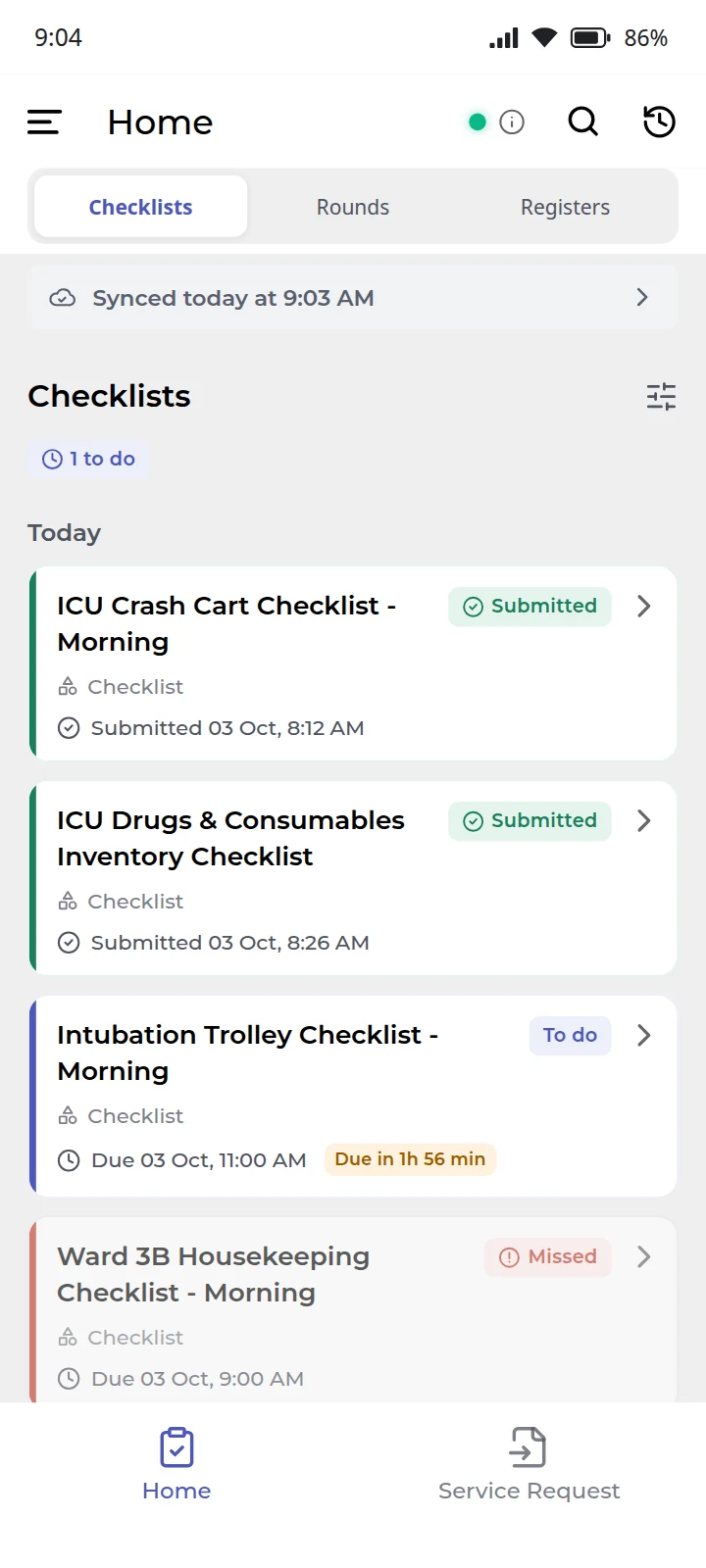
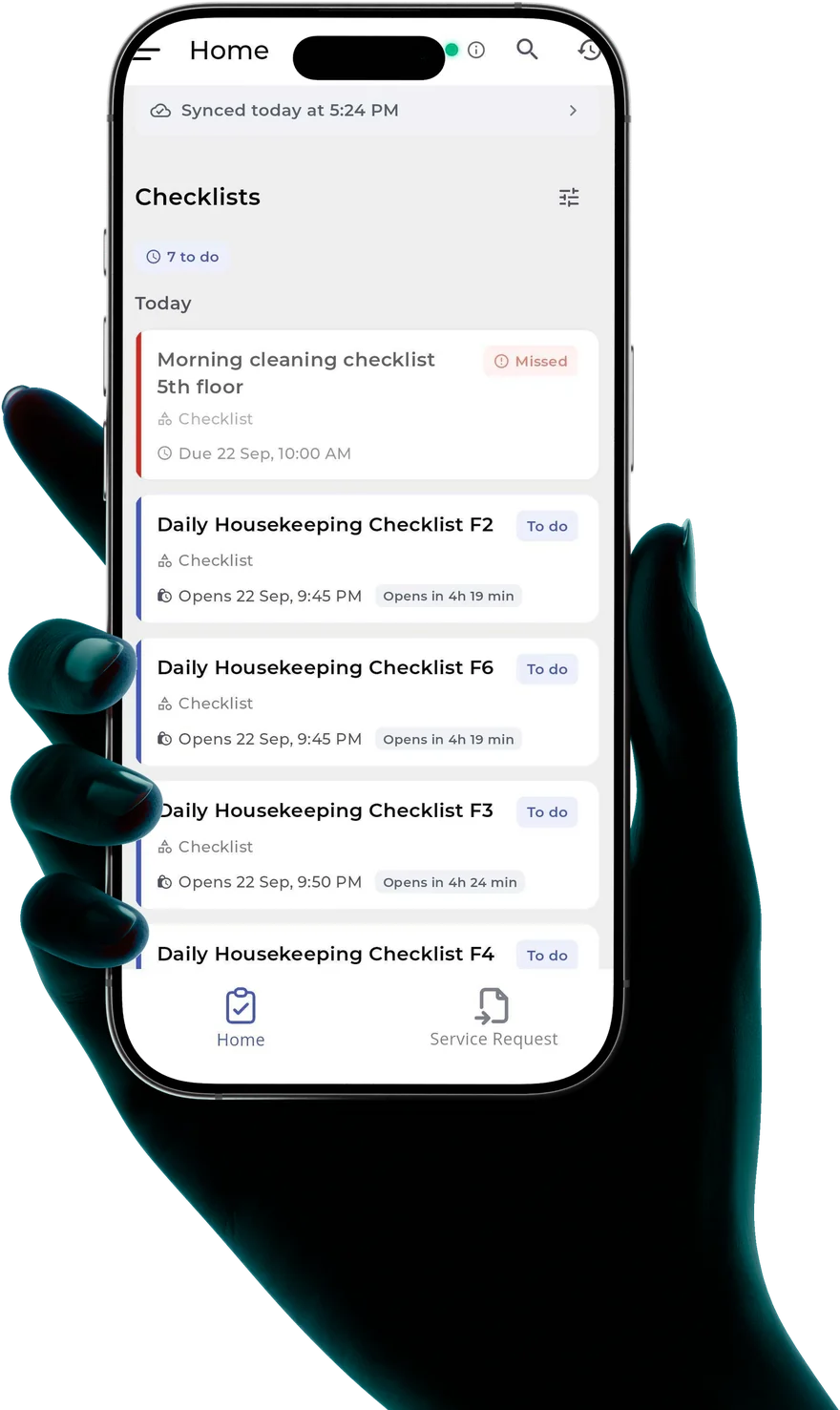
- Submitted in the appEach checklist opens in the EaseOps app at its scheduled time, so a shift sees what is due now, what opens later and what was missed. Staff answer it there: responses, photos, remarks, a signature and a location check. It works with no signal and syncs when the ward has one again.
- A failed check raises a service requestAny task that fails opens a service request against the user and the department that task is mapped to, with a due time on it. The assignee is told on WhatsApp, so it reaches them without anyone opening the app to look, and it is waiting in the app's service request tab when they do. A request still open past its due time runs an escalation ladder.
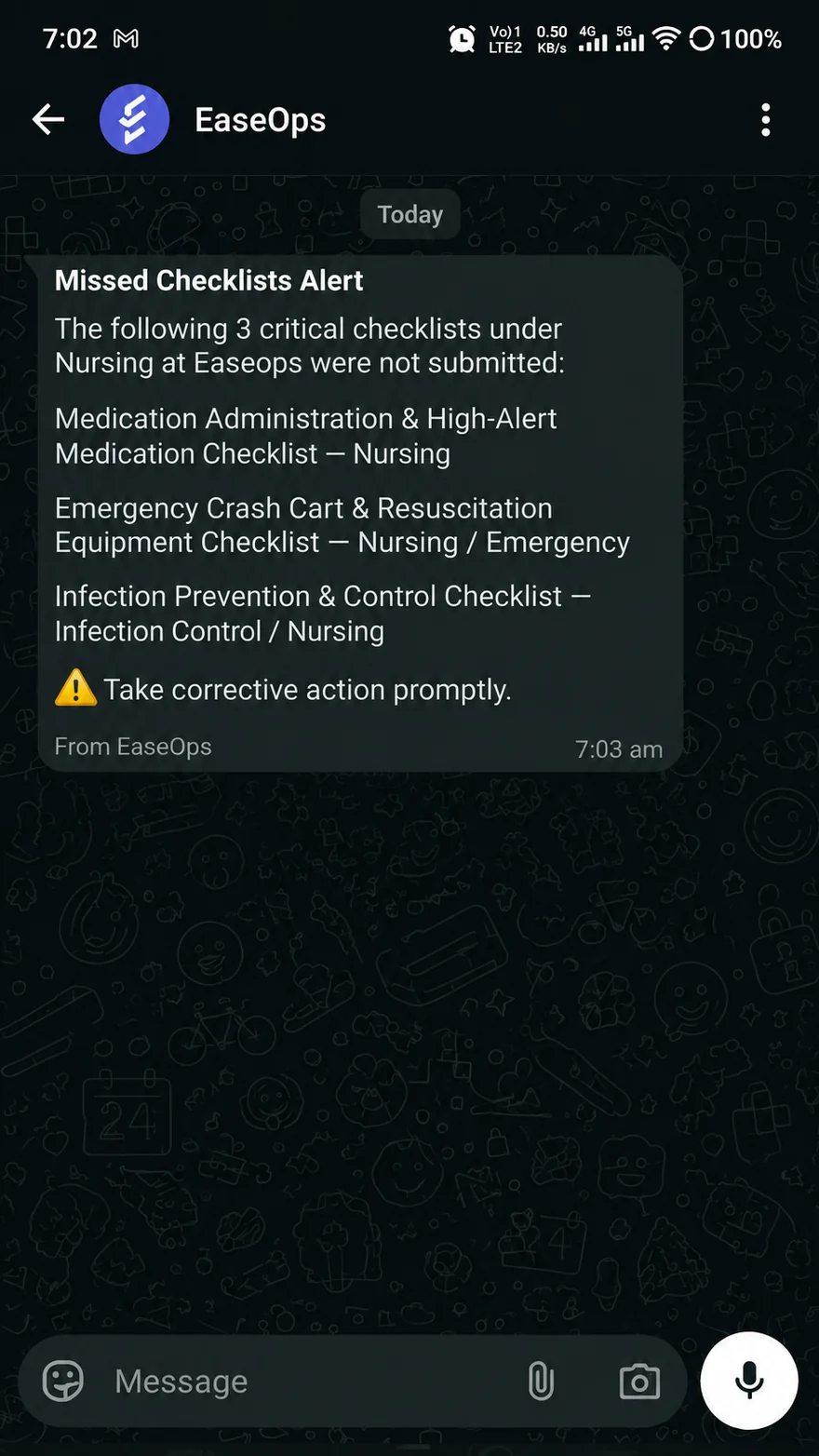
- Missed checklists reach the department head each dayA daily summary goes out naming what was not submitted, so a gap is a message the next morning rather than something found at the end of the month.
- All of it is trackable on the admin panelCompleted against missed, failed tasks, and every service request as open, overdue, closed or verified, broken down by location, department and checklist, with the submissions and the audit trail behind each number.
What it looks like on a ward
The alert below went out on WhatsApp, to the people answerable for the three checklists it names. Nobody compiled it, and nobody had to ask for it.
What management sees
The operations dashboard gives administrators and quality managers a live view of the hospital's operational status — without calling department heads or waiting for shift reports. Every task completed by any staff member on WhatsApp updates the dashboard in real time.
Management has visibility into whether critical rounds and checklists are being done, how patient requests are being resolved, and where the backlog is building — all from one screen, without leaving their desk.
- Live checklist and round completion rates by department
- Pending and overdue items with time elapsed
- Patient concierge queue and resolution status
- Patient complaint status and escalation flags
- Trend reports for rounds, checklist adherence, and concierge response time
- Staff-level activity view for accountability
Common questions about EaseOps Operations
Do staff need to install anything?
One light app on the phone they already carry, and nothing else. It works offline on a ward with no signal and syncs once there is one, so a low-end Android in a basement corridor is not a problem. Staff are told on WhatsApp when something needs them, so nobody has to go looking, and patients and visitors raise requests by scanning a QR code with no app at all.
How does voice logging work?
Staff speak instead of typing when they answer a task in the app. EaseOps transcribes the dictation using AI and files it against that task with a timestamp. Staff do not need to type. The transcription is attached to the task, round, or form as the official record.
Can we customise the checklists and forms?
Yes — all checklists, round templates, and forms are configured to your hospital's structure and NABH or JCI requirements during onboarding. If your workflow changes, configurations can be updated without code changes.
How long does onboarding take?
Most hospitals are operationally live within 2 to 4 weeks. Our team configures your workflows, sets up roles, and trains the relevant staff. There is no long implementation project — configuration happens in weeks, not months.
Does this connect to EaseQMS?
Yes — patient complaints raised in Operations can flow directly into EaseQMS as formal incidents. The two modules share the same platform and data, so no manual transfer is needed. Round and checklist data also contributes to the NABH readiness dashboard.
NABH chapters EaseOps Operations covers
Daily hospital operations directly contribute to NABH compliance evidence. EaseOps captures this evidence automatically as staff complete their rounds, checklists, and patient interactions — without any additional documentation step.
| NABH Chapter | EaseOps Feature | Evidence Generated |
|---|---|---|
| Facility Management & Safety (FMS) | Daily rounds + checklists | Timestamped round logs, checklist completion rates, photo evidence |
| Hospital Infection Control (HIC) | Infection control checklists | HIC round records, compliance logs, corrective action notes |
| Patient Rights & Education (PRE) | Patient concierge + feedback | Service request logs, complaint resolution records, satisfaction data |
| Human Resource Management (HRM) | Staff activity + reminders | Role-based task completion, attendance in rounds, compliance rates by staff |
| Clinical Governance | Digital registers + forms | Searchable digital registers replacing all paper logbooks |
Who uses EaseOps Operations
EaseOps Operations is used by the people who run the hospital floor day to day — from the COO who needs visibility to the housekeeper who needs to log a completed task without stopping to type.
COO / Hospital Administrator
Gets a live operations dashboard — round completion rates, pending tasks, patient complaint queue, SLA breaches — without calling department heads for status updates.
Nursing Head / Nursing Supervisor
Assigns rounds, monitors completion on mobile, and receives escalation alerts when checklists go overdue — without maintaining a separate tracking spreadsheet.
Department Heads
Receive WhatsApp notifications for their department's pending tasks, view completion history, and get patient service request alerts — no app to install or learn.
Frontline Staff (Nurses, Housekeeping, Technicians)
Complete rounds and checklists by replying to WhatsApp messages or sending a voice note. No smartphone training required — they use WhatsApp they already know.
What hospitals see after going live
Four products, one platform
They share the same staff, the same phones and the same audit trail, so a hospital can start with one and add the others without a second rollout.
EaseOps OperationsRounds, checklists, patient requests and forms — on WhatsApp, logged by voice.
You are here EaseQMS
Incidents, CAPA, drills, quality indicators, SOP control and committee meetings.
View EaseQMS EaseAsset
QR-based equipment register, preventive maintenance, calibration and e-waste.
View EaseAssetAccredAIAI gap analysis against current NABH and JCI standards, updated as they change.
View AccredAISee EaseOps Operations in your hospital
We walk through a live configuration built around your hospital's workflows, departments, and NABH status.