 EaseAssess
Know how ready you are
for NABH, today.
EaseAssess scores every objective element of NABH's Digital Health Standards the way NABH scores them, shows the award you would get today, ranks every gap and maps the shortest roadmap to the award you want. Free for hospitals, and for the consultants who guide them.
- Free, no card needed
- Hospitals & consultants
- 182 objective elements
- Silver · Gold · Platinum
EaseAssess is a free NABH readiness assessment. Score each objective element 10, 5 or 0 against its rule, and it calculates readiness by category, the award you would reach today, every gap ranked by what it blocks, and the fewest fixes to your target award.
A spreadsheet of yeses is not a readiness score.
One requirement at a time. Scored the way NABH scores it.
Every objective element is a plain question with its rule beneath it: ten when it is fully met, five when it exists but is incomplete, zero when it is missing. Not applicable is refused wherever the standard does not allow it.
The award you would get today, and what stands in the way.
Each category is measured against its pass mark. The ladder shows the award you have reached and the one a category short, and every gap behind it is ranked, with the quick wins flagged.
What is EaseAssess?
EaseAssess is a free NABH readiness assessment for hospitals and for the consultants who assess them. It scores all 182 objective elements of NABH's Digital Health Standards the way NABH scores them, calculates each category against its pass mark and the award you would reach today, ranks every gap by how much it blocks your target, and turns the shortest roadmap into gap actions with an owner and a due date. A consultant or assessor can verify the scores, and a readiness report goes to management or the client.
From a blank assessment to the award you want
What each part of EaseAssess does, in the order you use it. Every screen is the app itself, with sample data.
Assessments
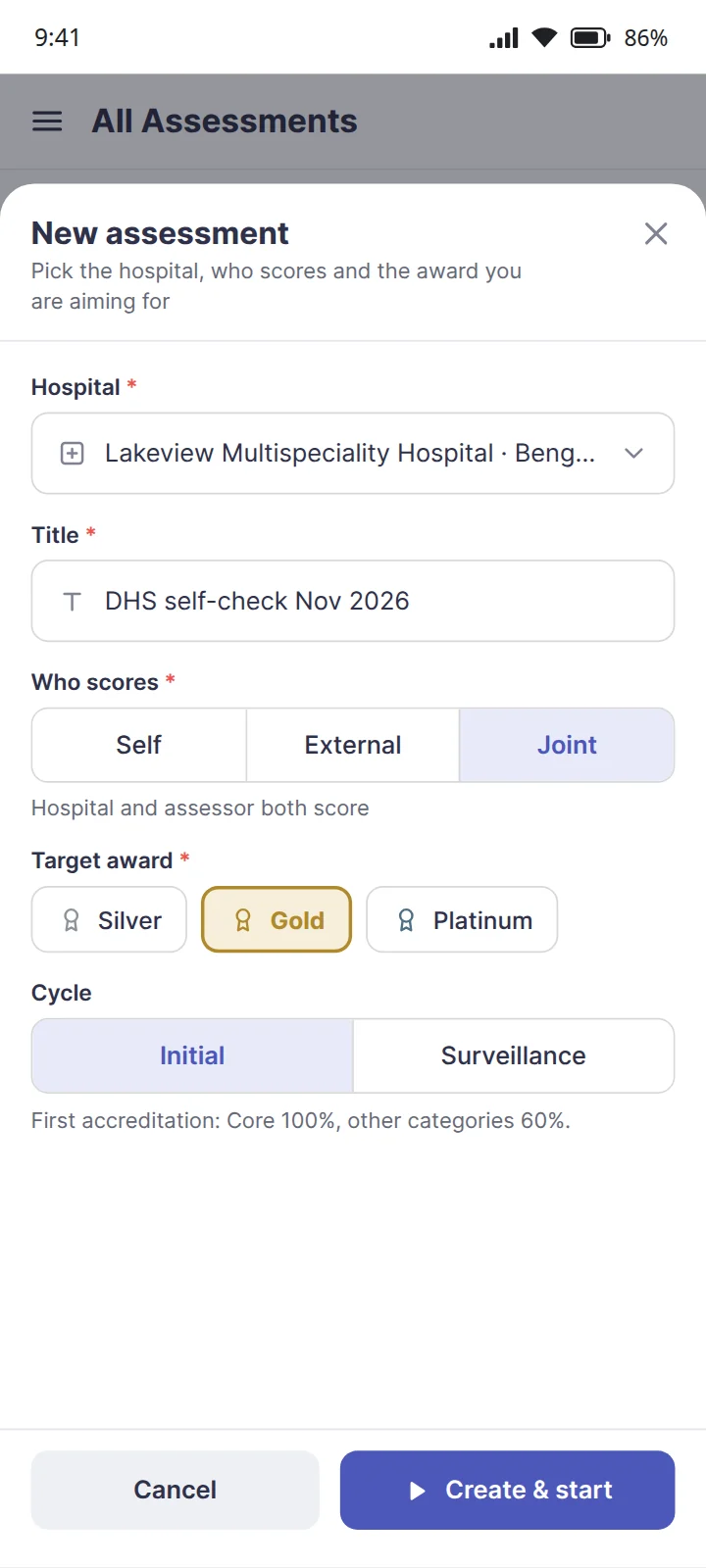
Start an assessment in a minute: pick the hospital, choose who scores, and set the award you are aiming for.
- Self-assessment, an external assessor, or both scoring side by side
- A target award of Silver, Gold or Platinum, which the gaps and the roadmap are built around
- The initial cycle, or the surveillance assessment 24 months on, where the non-Core pass marks rise to 80%
NABH: the Digital Health Standards' award grid, for first accreditation and for surveillance, built in
Walkthrough
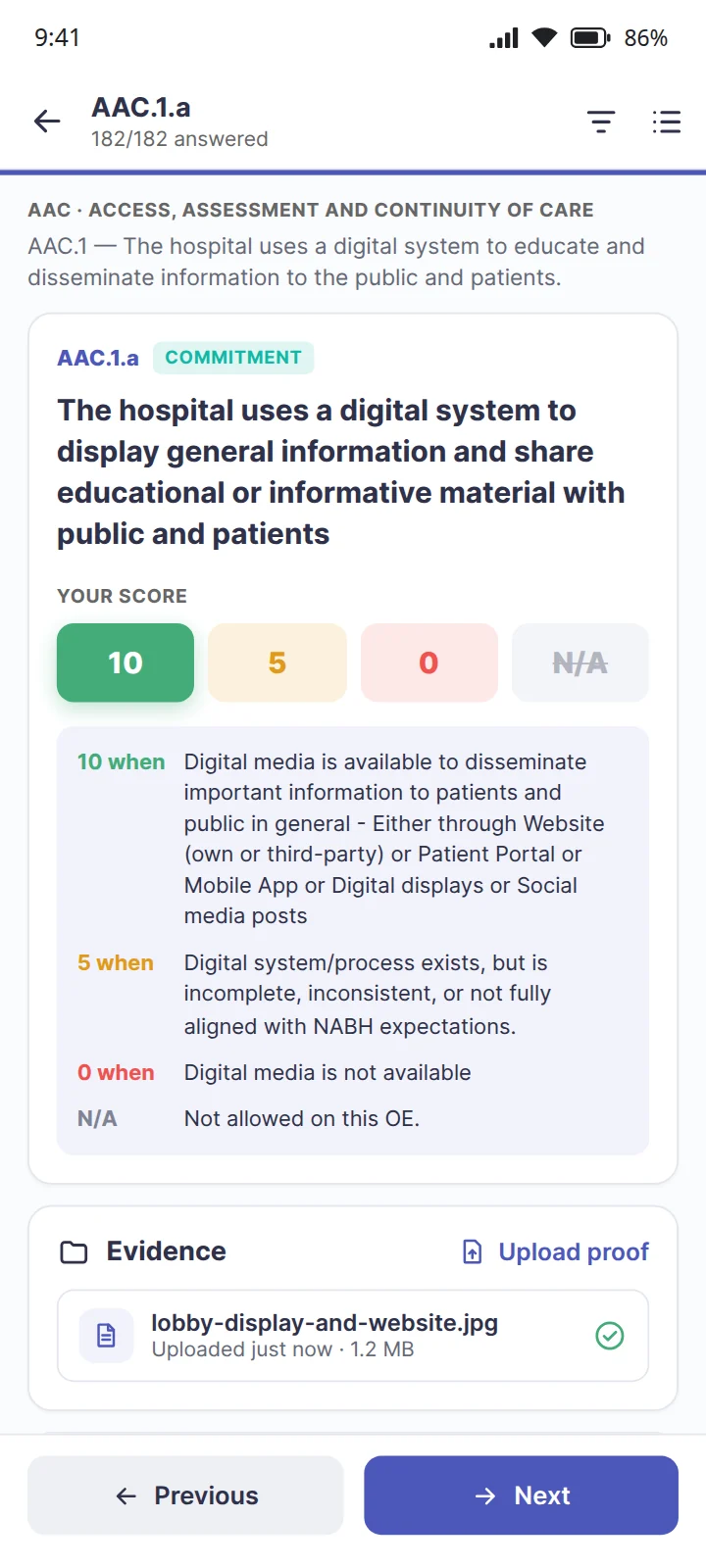
Each objective element is a plain question with its scoring rule beneath it, so a score means what NABH means by it.
- 10 fully met, 5 partly met, 0 not met; not applicable only where the standard allows it
- Proof uploaded and remarks added as you score: what is in place, what is missing, who owns it
- Jump to any objective element, or filter to the unanswered ones and the gaps
NABH: each objective element's category, Core, Commitment, Achievement or Excellence, on the question itself
Readiness
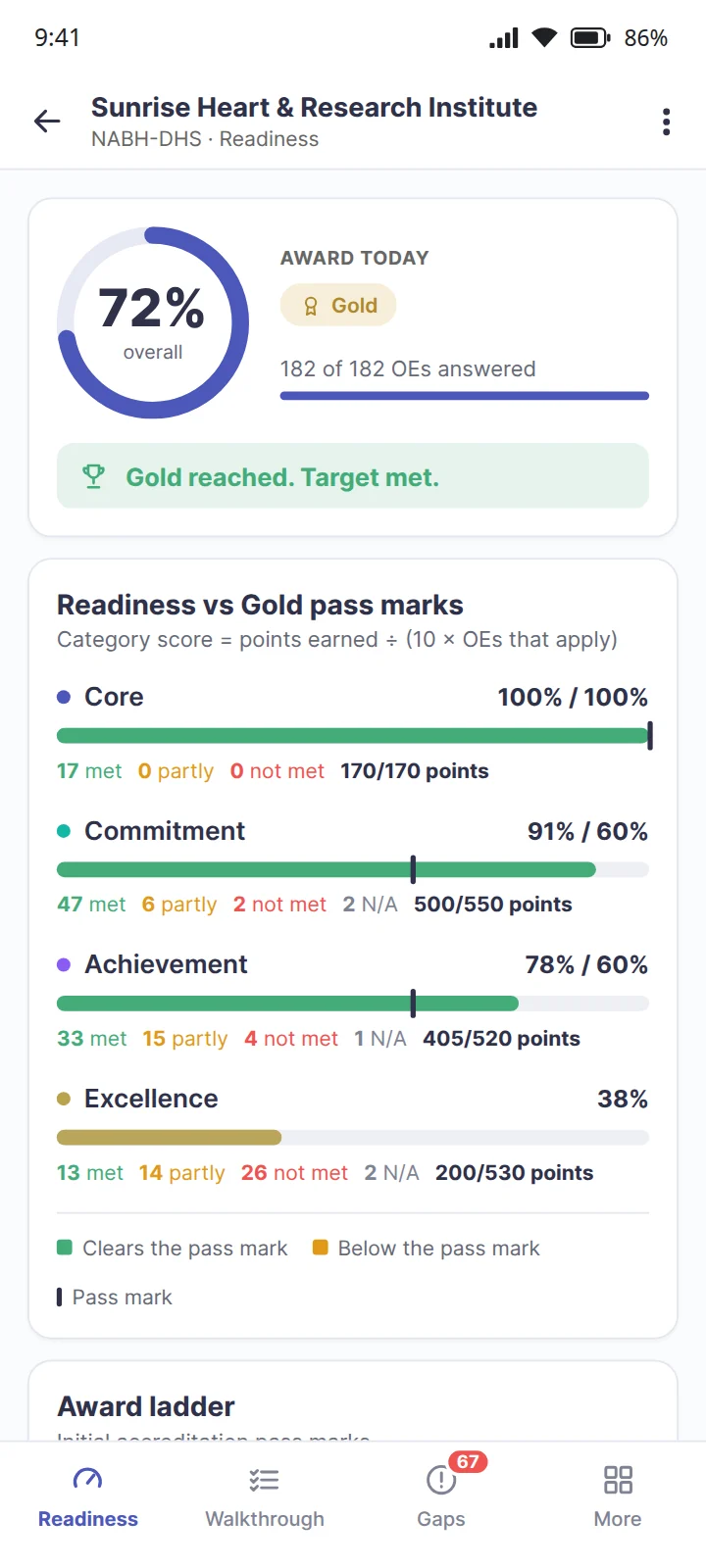
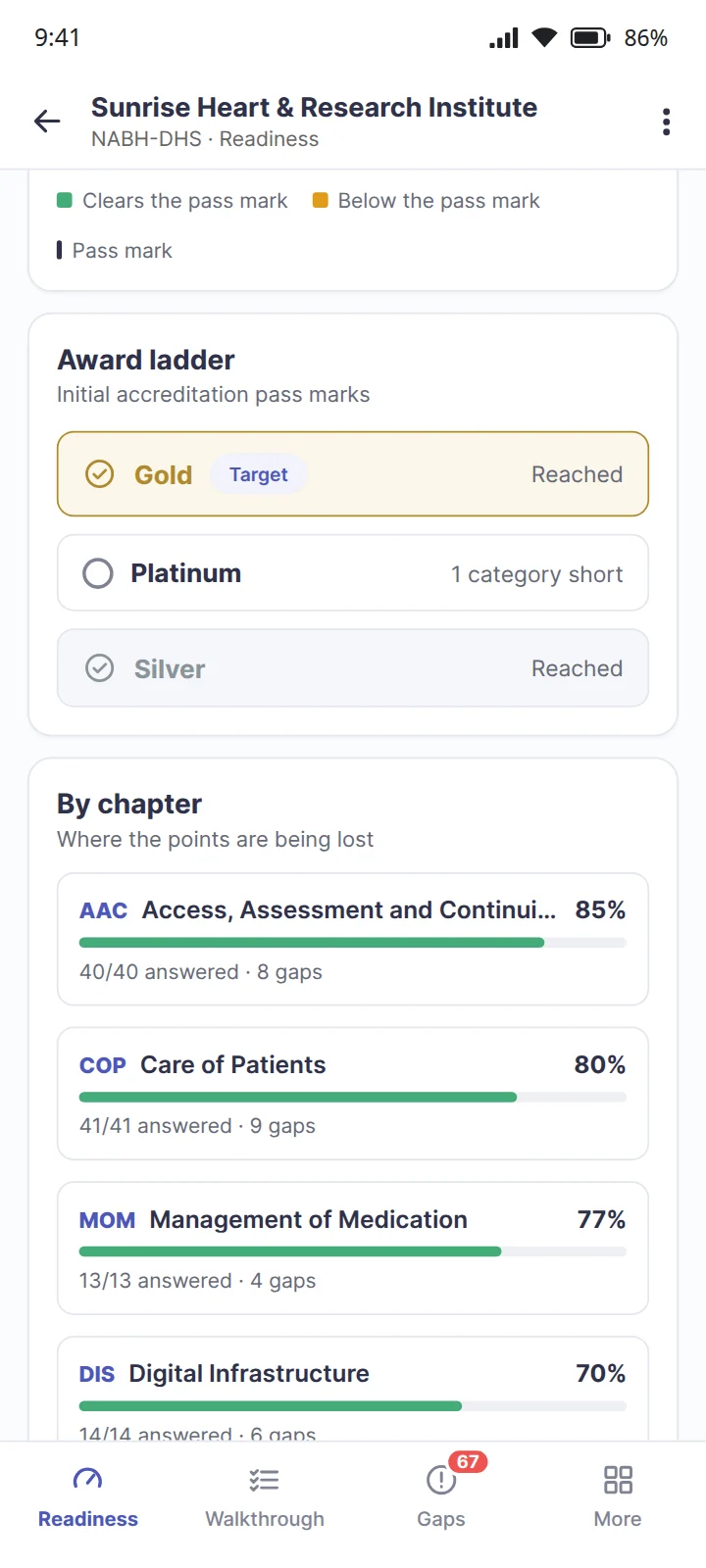
As the scores go in, readiness is calculated: every category against its pass mark, and the award you would reach today.
- Each category scored as points earned divided by ten times the objective elements that apply
- The award ladder shows what you have reached and what is a category short
- By chapter, where the points are being lost
NABH: readiness is an estimate from your own scores, not an NABH decision, and the report says so
Gaps & AI help
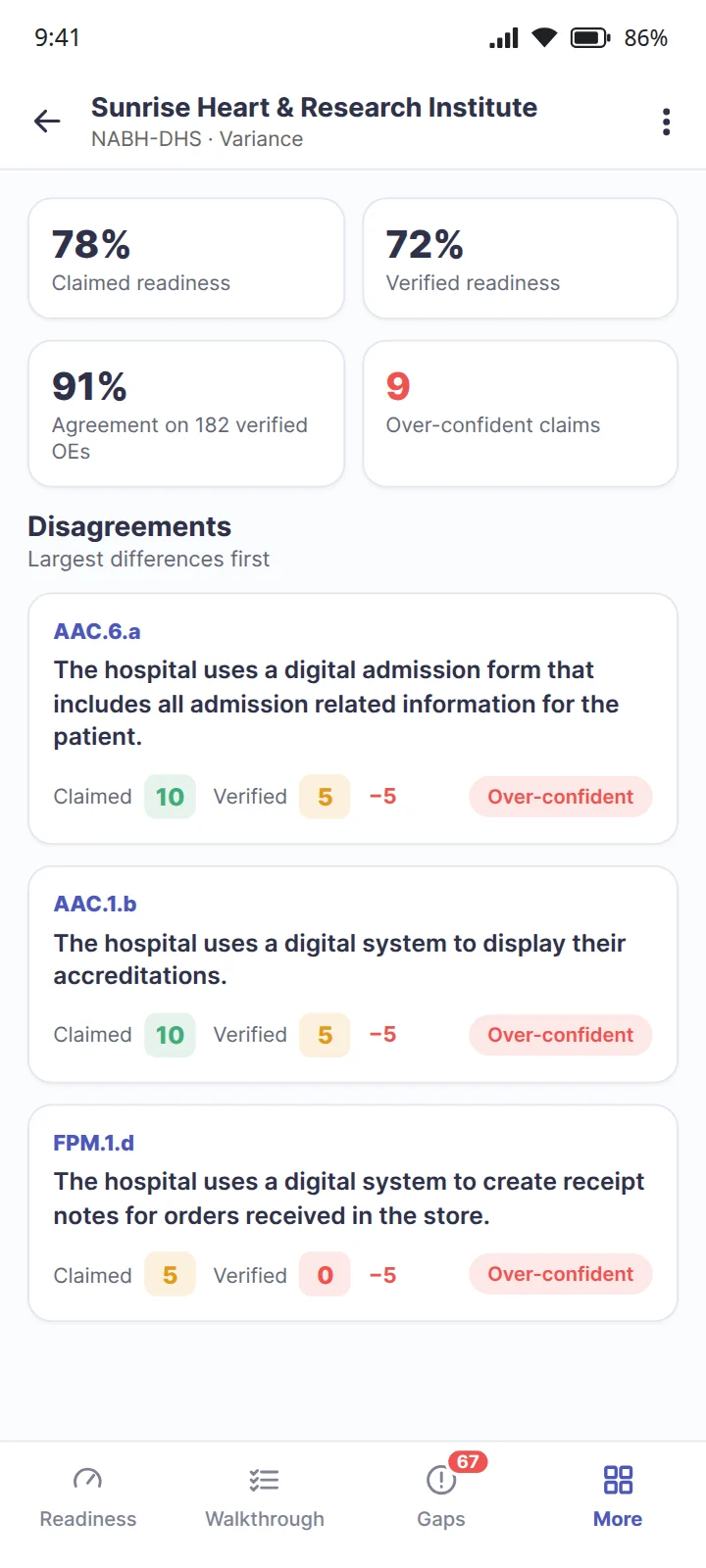
Every objective element scored 5 or 0 becomes a gap, ranked by how much it blocks your award, Core first.
- Quick wins flagged: the gaps already at 5, which need finishing rather than building
- AI help explains what the requirement means, why it matters and how to fix it, for your scores
- Every gap carries its own gap action and its status
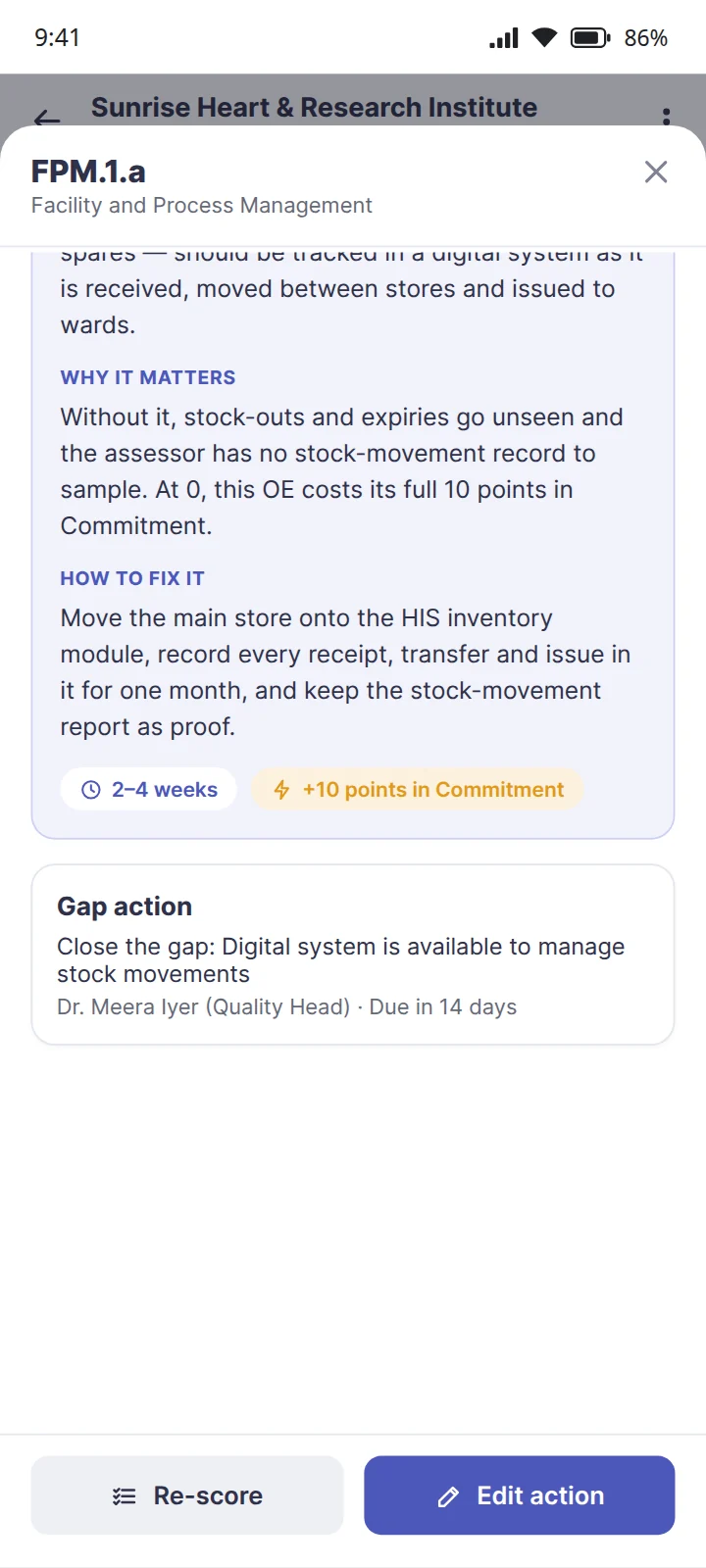
Roadmap
The fewest objective elements to fix to reach your target award, phase by phase, quick wins first.
- Phases follow the categories, Core first, each with its score against its pass mark
- Says when a category cannot clear its pass mark until more of it is scored
- One tap turns the roadmap into gap actions
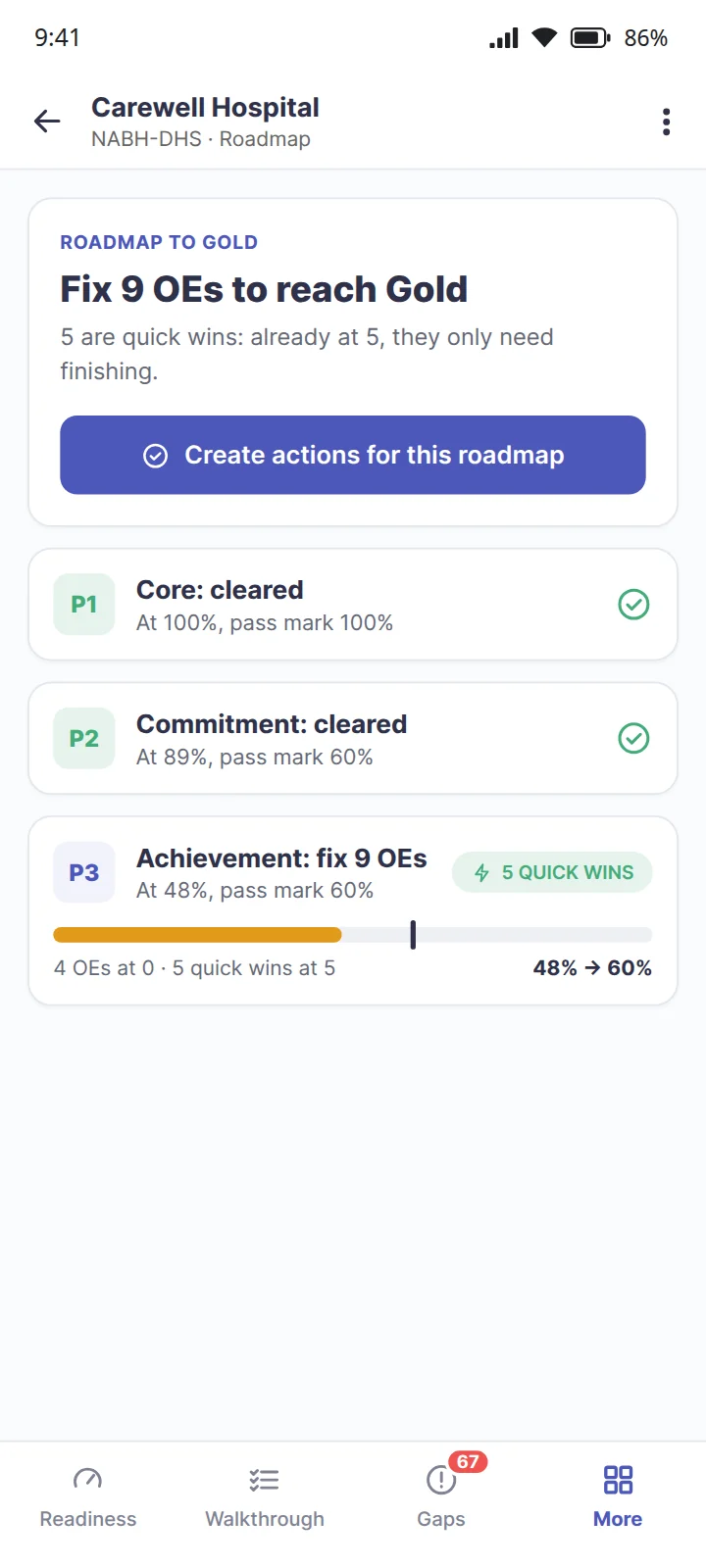
Gap actions
Every gap gets an action with an owner and a due date, worked as a list or on a board.
- Open, in progress, done or dropped, changed from the card
- Every action tied to its objective element, its assessment and its hospital
- Open and overdue actions counted on the dashboard
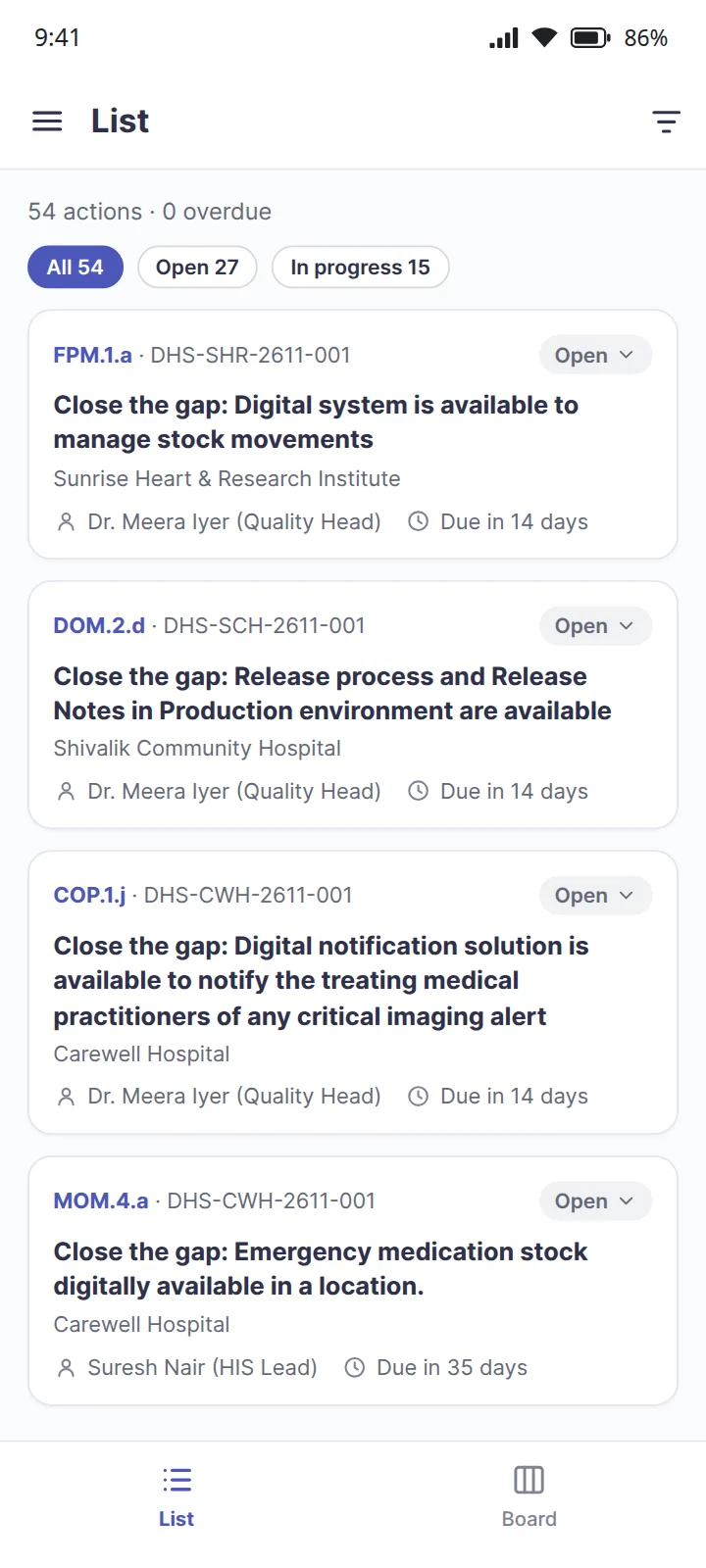
Verification
Send an assessment for review and a consultant or assessor verifies every score. Where both have scored, the assessor's wins.
- Claimed and verified readiness side by side
- Disagreements listed largest first: the hospital said 10, the assessor said 5
- Over-confident claims counted, so they surface before the real assessment
Documents
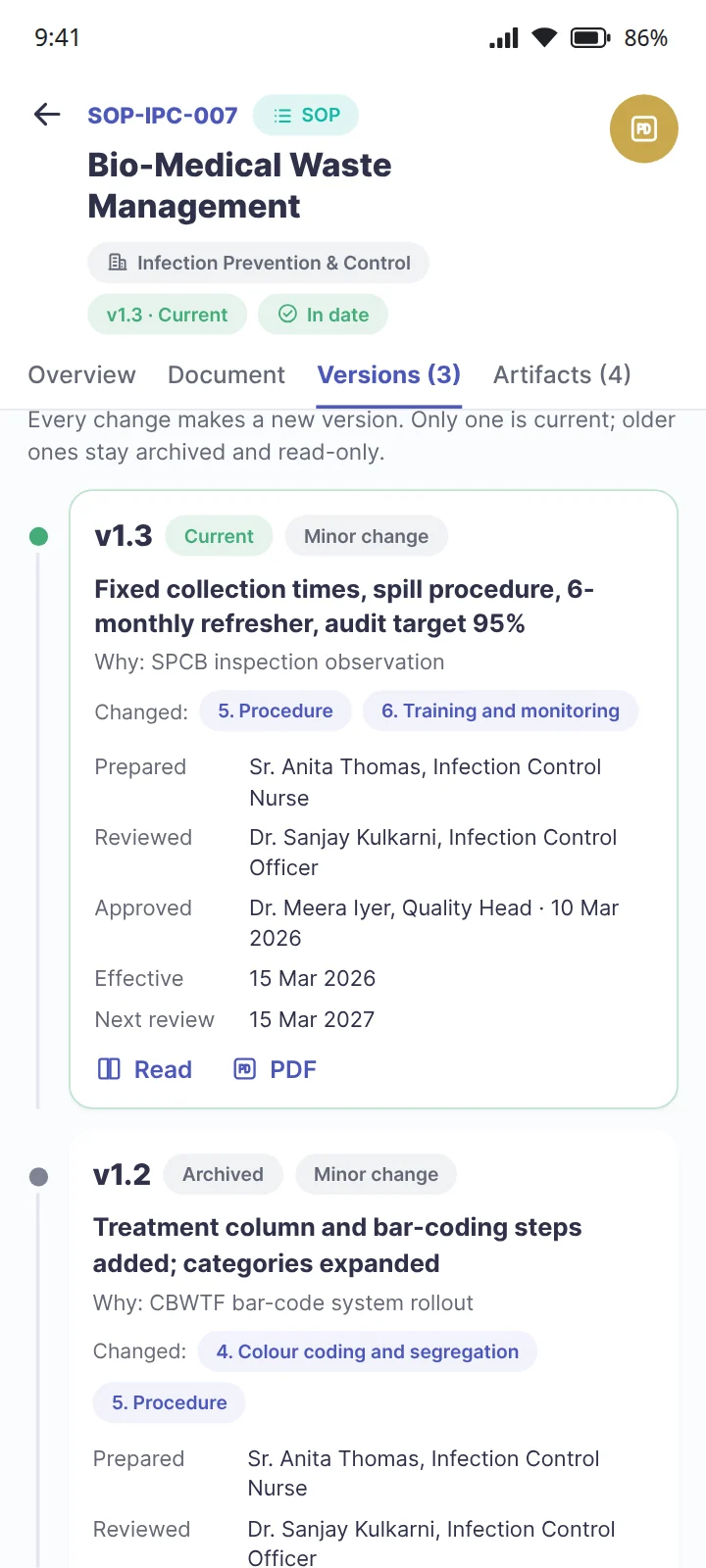
SOPs, policies, forms, manuals and plans, department by department, each with its full version history.
- In date, due for review or overdue, at a glance
- Who prepared, reviewed and approved each version, what changed and why; old copies kept and stamped superseded
- Search every word of every version, current or archived
NABH: the controlled documents an assessor asks to see, with their history. For document control across a whole hospital, see document management
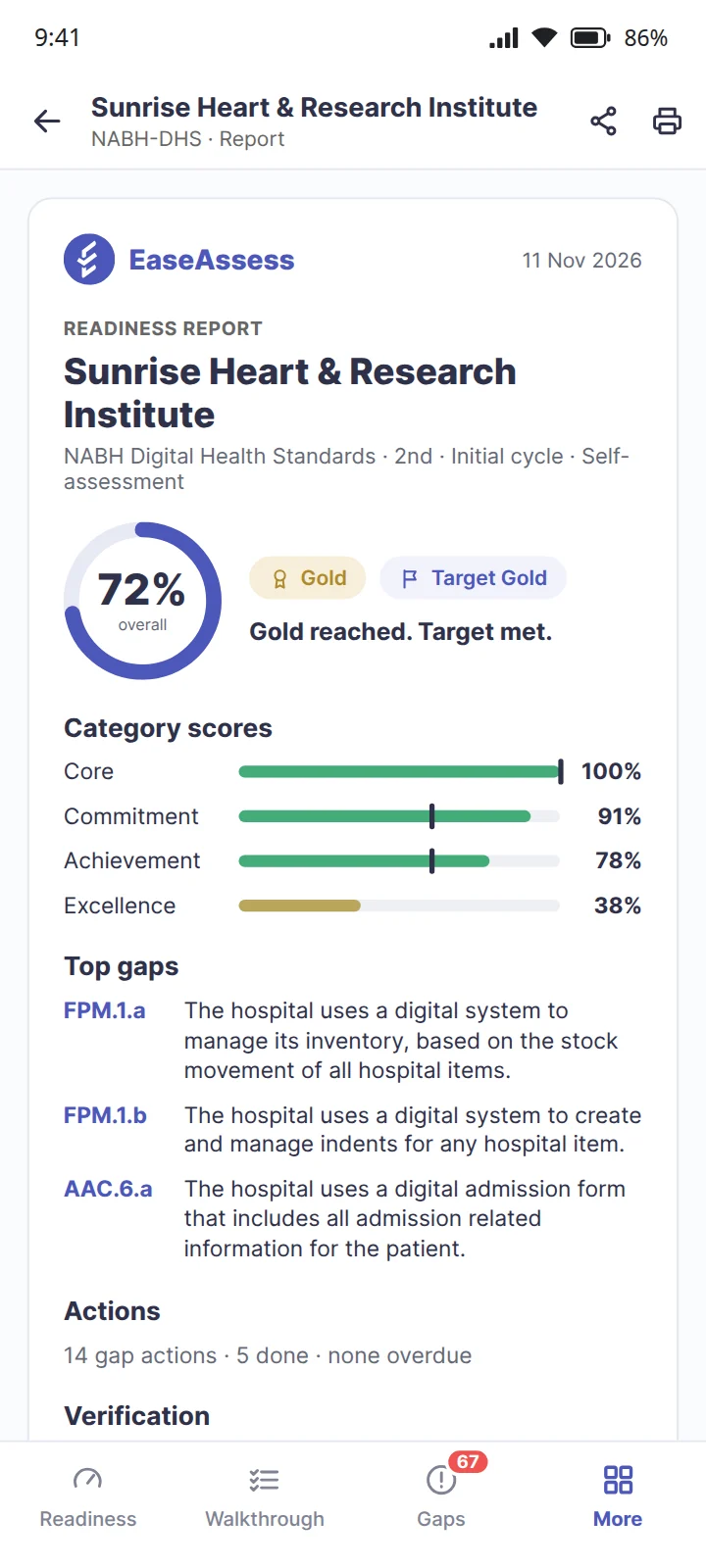
Report
A readiness report to share: the award today, the category scores, the top gaps, the roadmap, the actions and the verification.
- Shared with management, or with the client hospital a consultant assessed
- Names who prepared it
- Says plainly that the scores are a readiness estimate, not an NABH decision
How a score becomes a roadmap
The same four moves run behind every assessment. None of them is a spreadsheet, and none of them waits for a consultant's visit.
- ScoredEach objective element is answered against its rule, 10, 5 or 0, with proof and remarks.
- MeasuredEach category is measured against its pass mark, and the award you would reach today follows from them.
- RankedEvery gap is ranked by what it blocks. Quick wins are flagged, and AI help explains each one.
- PlannedThe fewest fixes to the target become gap actions, each with an owner and a due date.
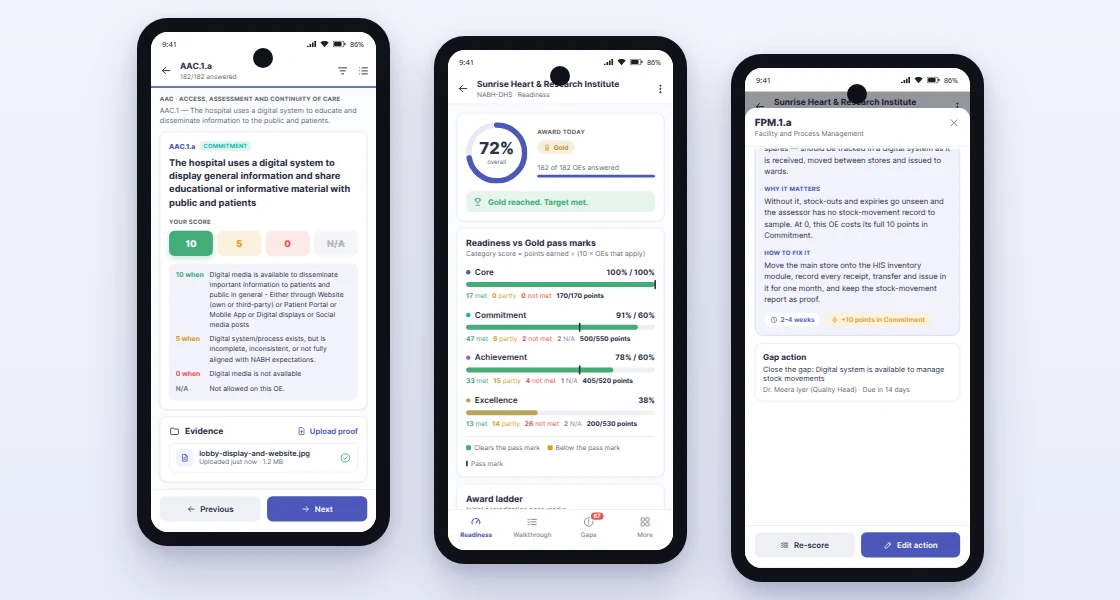
What it looks like as you score
One requirement scored against its rule, the readiness it adds up to, and AI help on a gap that is costing ten points.
NABH Digital Health Standards: how the award is decided
NABH's Digital Health Standards, 2nd edition, divide 38 standards into 182 objective elements: 17 Core, 57 Commitment, 53 Achievement and 55 Excellence. Each objective element is scored 10 when fully met, 5 when partially met and 0 when not met; one that does not apply to the hospital is marked not applicable and left out. A category's score is the points it earns divided by the highest score possible on the objective elements that apply, and the award is the highest level whose pass marks every category clears.
| Award | Core | Commitment | Achievement | Excellence |
|---|---|---|---|---|
| Silver | 100% | 60% 80% at surveillance | Not evaluated | Not evaluated |
| Gold | 100% | 60% 80% at surveillance | 60% 80% at surveillance | Not evaluated |
| Platinum | 100% | 60% 80% at surveillance | 60% 80% at surveillance | 60% 80% at surveillance |
Source: NABH Digital Health Standards, 2nd edition, published by NABH as a draft, tables 1 and 2. EaseAssess applies these grids as written; NABH's final text governs any assessment. For the hospital accreditation standards themselves, see the NABH accreditation guide.
For a hospital, and for the consultant beside it
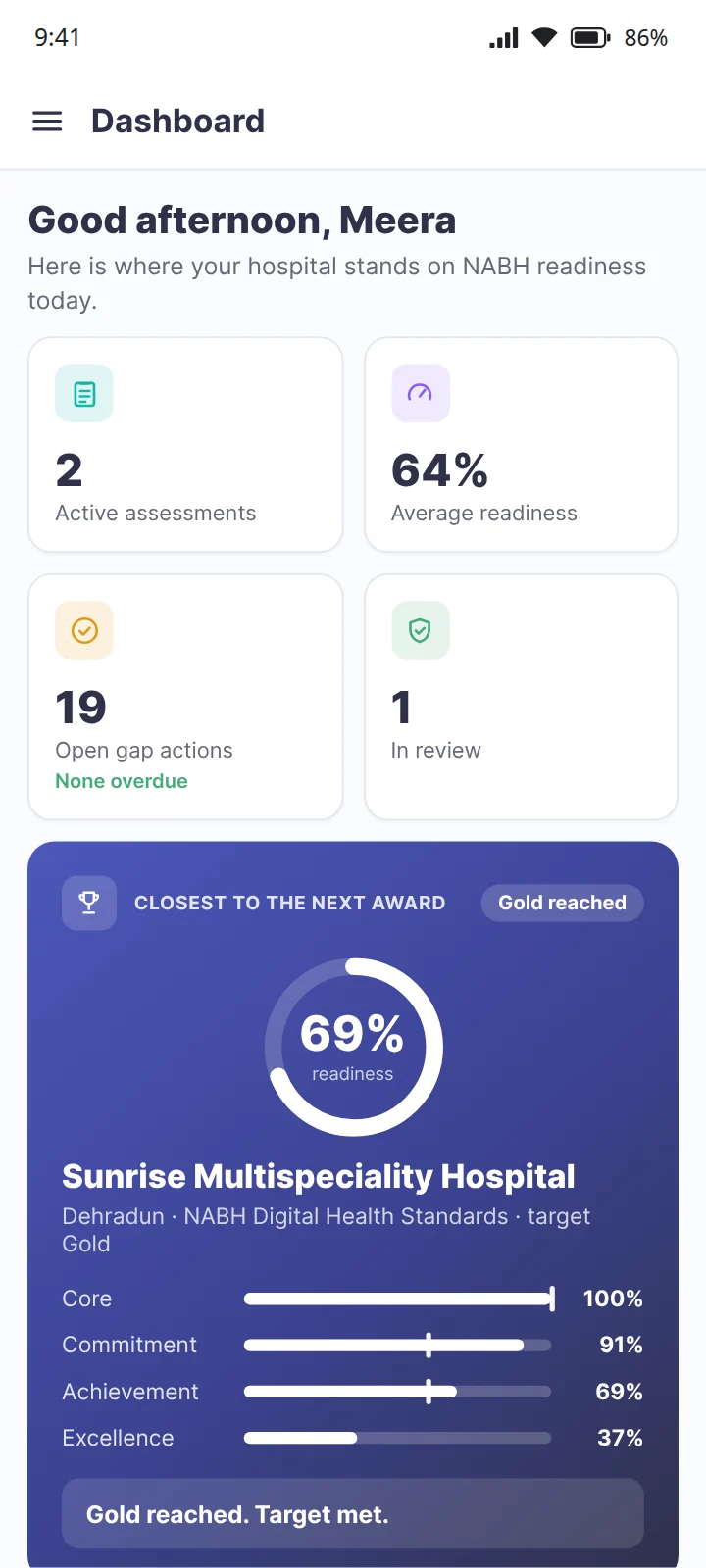
A hospital assessing itself
The quality head or medical superintendent scores the hospital, sees the award it would get today and works the roadmap. One hospital account holds its own locations, each with its own assessment.
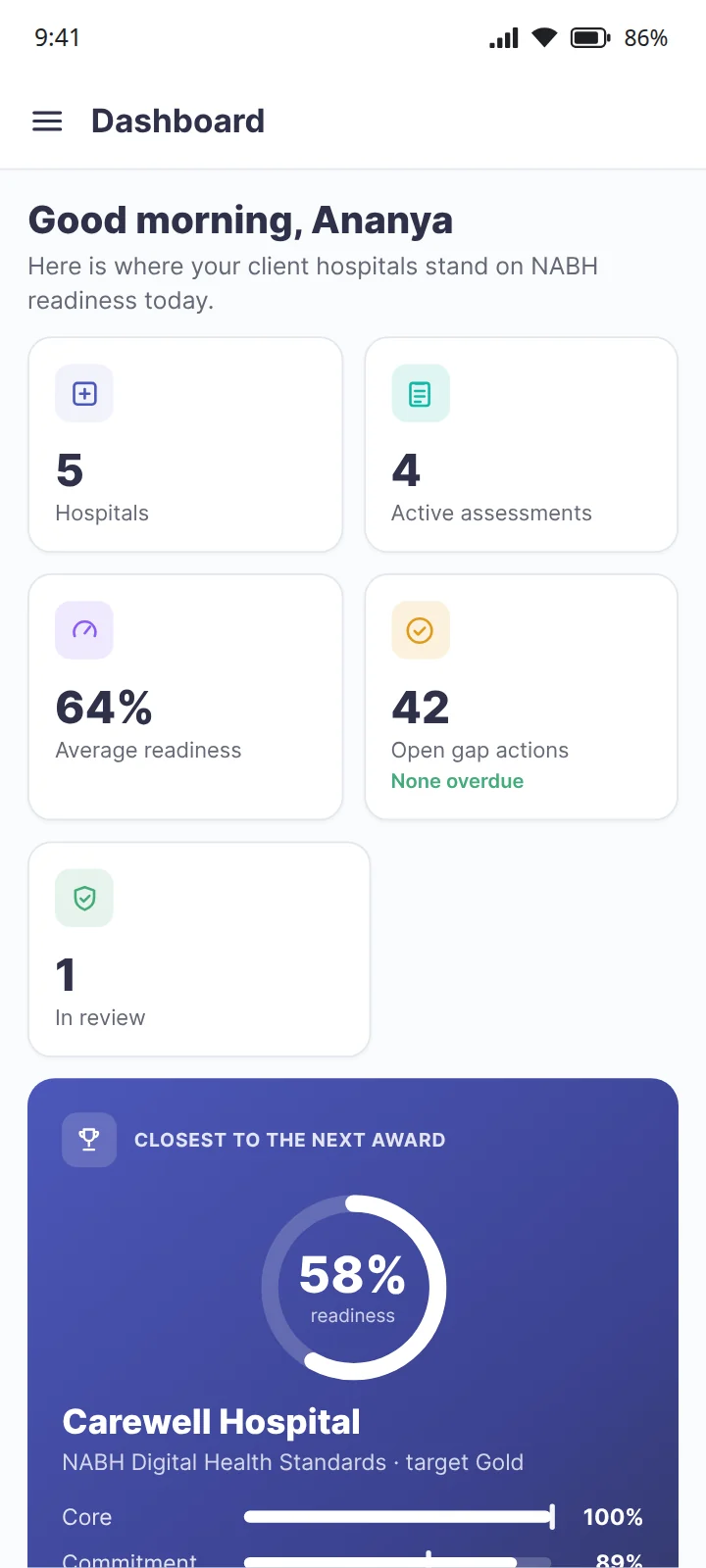
A consultant assessing clients
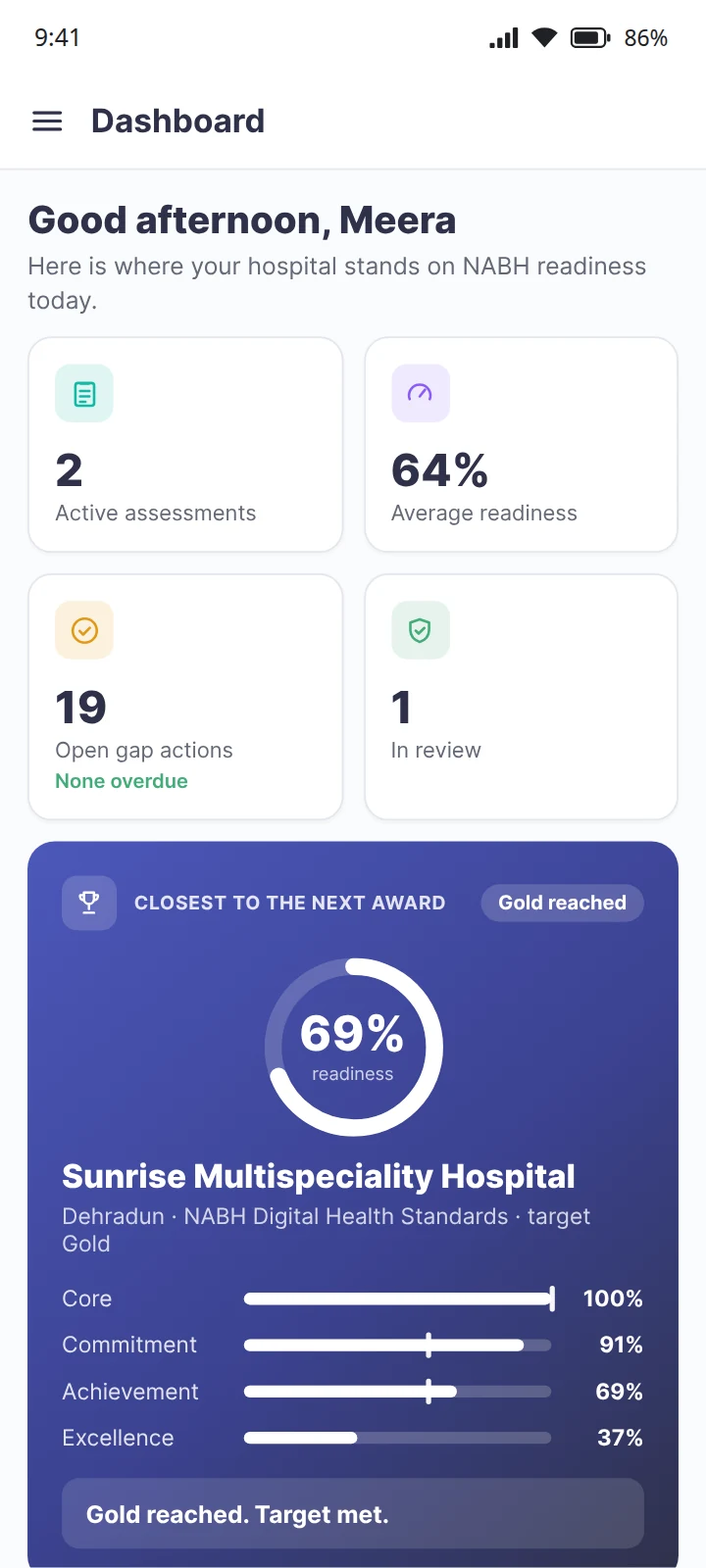
A consultant adds each client hospital, runs an assessment for each and sees readiness across all of them on one dashboard: which hospital is closest to its next award, and exactly what is holding it back.
Free to find out. Then keep it that way.
EaseAssess tells you where you stand and what to fix. The work that keeps a hospital there is what the rest of EaseOps runs.
Free, with no limit
Sign up, add the hospital and start scoring the same day. No card, and no cap on assessments.
Scored the way NABH scores
The same 10, 5 and 0, the same categories and the same pass marks, so the award you see is the one the grid gives.
Rounds, audits and checklists
The daily work an assessor samples runs in EaseOps Operations, logged as it happens.
Incidents, CAPA, drills and indicators
The quality system that keeps the evidence current runs in EaseQMS. See how it fits NABH accreditation.
Questions, answered
What is EaseAssess?
EaseAssess is a free NABH readiness assessment for hospitals and for consultants who assess client hospitals. It scores every objective element of NABH's Digital Health Standards the way NABH scores them, calculates the award a hospital would reach today, ranks every gap by how much it blocks the target award, and turns the shortest roadmap into gap actions with an owner and a due date.
Is EaseAssess free?
Yes. EaseAssess is free for hospitals and for consultants, with no limit and no card needed. The ongoing work that keeps a hospital accredited, such as rounds and audits, incidents and CAPA, drills and quality indicators, is what the other EaseOps products run.
Which NABH standard does EaseAssess score against?
NABH's Digital Health Standards, 2nd edition: 182 objective elements across 38 standards, of which 17 are Core, 57 Commitment, 53 Achievement and 55 Excellence. The award is Silver, Gold or Platinum.
How are Silver, Gold and Platinum decided?
Each category is scored as the points earned divided by ten times the objective elements that apply. At first accreditation, Silver needs Core at 100% and Commitment at 60%; Gold adds Achievement at 60%; Platinum adds Excellence at 60%. At the surveillance assessment 24 months later the 60% marks rise to 80%, and EaseAssess applies them when you choose the surveillance cycle.
How is each objective element scored?
10 when it is fully met, 5 when the system or process exists but is incomplete or inconsistent, and 0 when it is not in place. Not applicable is accepted only where the standard allows it, and it is left out of the score. Each answer can carry remarks and uploaded proof.
Can a consultant use EaseAssess for several hospitals?
Yes. A consultant signs up once, adds each client hospital, runs an assessment for each and sees readiness across all of them on one dashboard, including which hospital is closest to its next award and why. A hospital signs up for itself and sees its own locations.
What does verification by an assessor add?
A hospital can score itself, an external assessor can score it, or both can. When both have scored, EaseAssess keeps the hospital's claim beside the assessor's score, uses the assessor's where they differ, and lists the disagreements largest first, so over-confidence surfaces before the real assessment.
What does AI help do?
On any gap, AI help writes a plain explanation of what the requirement means, why it matters and how to fix it, based on your scores. It is guidance to act on, not an NABH decision, and the report says so.
Five products, one platform
The four that run the daily work share the same staff and the same hospital setup, so a hospital can start with one and add the others without a second rollout. EaseAssess is free, and shows where to start.
 EaseOps Operations
Rounds, checklists, patient requests and forms in one app, logged by voice.
View EaseOps Operations EaseQMS
Incidents, CAPA, drills, quality indicators, SOP control and committee meetings.
View EaseQMS EaseAsset
QR-based equipment register, preventive maintenance, calibration and e-waste.
View EaseAssetAccredAIAI gap analysis against current NABH and JCI standards, updated as they change.
View AccredAIEaseAssessFree NABH readiness assessment: your award today, every gap ranked, the shortest roadmap.
You are hereKnow how ready you are, today
Free for hospitals and consultants. No card needed, and no limit on how many hospitals you assess.